Dental patient communication has moved well beyond appointment reminders. Large practices and hospital-based dental teams…

Looking for a Healthcare Contact Center Solution? Here’s What You Need to Know
Every patient interaction is supposed to move care forward. But small breakdowns in communication often get in the way. Patients call for an updated but end up explaining the same details to multiple agents. They find time during their work to quickly schedule an appointment, but your staff makes them wait while they jump between different systems.
Contact center software closes that gap for modern healthcare. It connects patients to the right team on the first try and pulls up records in seconds. Simple requests are handled automatically, so your staff can focus on more complex cases.
In this article, you’ll learn what these systems actually do, which features make a real difference, and how to choose and roll out the right platform for your organization.
The Evolved Communication Needs of Healthcare Contact Centers
Patients now expect the same speed and convenience from healthcare that they get from their retail store or their banking app. They want to schedule online appointments and get lab results through an online portal. Most importantly, patients want their problems solved without sitting on hold.
The thing is that phone calls still matter, but they’re no longer enough. Healthcare contact centers now need to support other channels like text messages, web chat, and email without forcing patients to start over each time they switch channels.
Healthcare providers are also seeing their call volume rising. Large hospital systems can easily see thousands of calls per day. Traditional phone systems buckle under that load and your staff burns out answering the same questions.
Healthcare-specific software for contact centers addresses this by distributing work intelligently. Simple requests like appointment confirmations and billing questions route to automated systems. Complex clinical questions go straight to medical specialists. Emergency situations trigger immediate escalation protocols.
The technology also connects scattered information. When a patient calls, agents see their full history on one screen. No more asking patients to repeat their date of birth or why they’re calling. The conversation starts with context.
You’re essentially using tech to turn communication from a bottleneck into a competitive advantage. You handle more interactions with the same staff, respond faster, and give patients the experience they’ve come to expect from every other service they use.
Challenges Current Healthcare Contact Centers Face
Patient expectations are higher than ever. A minor delay or missed appointment is all it takes for them to start searching for another provider. Your team knows this. They feel it in every rushed call and every patient who hangs up before getting help.
Long Wait Times Leading to Poor Patient Experiences
Nothing damages trust faster than making someone wait. Long hold times happen when calls stack up because there’s no set rule for which ones get answered first. A patient calling to confirm their appointment tomorrow might have to wait behind someone checking office hours.
These delays ripple out beyond the call itself. Patients who can’t get through miss critical follow-ups or skip preventive care. This means lost revenue and lower satisfaction scores that are hard to fix. It’s the most visible problem your healthcare contact center software needs to solve.
High Call Volumes and Limited Staff
Your support teams face impossible odds because call volumes can spike without warning. A billing cycle alone can trigger hundreds of questions. But you can’t staff for peak demand every single day. That just bleeds your budget.
This leaves your teams constantly rushing through calls to clear the queue. They don’t have time to fully address questions or follow up on complex issues. You end up with agents that are completely burned out, most of whom leave within the first year. The increased turnover means you’re always training new staff, which adds to your costs and disrupts patient experience.
Agents Juggling Through Multiple Disconnected Systems
Disconnected systems add to your agents’ woes. They have to switch between your EHR and scheduling tools for every call. They might even have to check a separate sheet for billing concerns.
Every screen switch takes time. This also increases the chance of human errors. An agent might pull up the wrong patient record or book the wrong time because they were looking at the wrong system. It just creates more work for your staff who have to fix them later.
Limited Self-Service Options for Simple Patient Requests
Most calls to a healthcare contact center don’t require an agent. Patients calling to confirm an appointment time or verify office hours could get that information instantly through an automated system. But without good self-service options, every simple request ties up an agent.
Even organizations that try to add self-service often fail because the tools don’t connect to real data. An IVR system that can’t check your actual schedule or doesn’t know if you’re an established patient just frustrates people more than helping.
Difficulty Prioritizing Urgent vs Routine Calls
Urgent concerns get delayed because your team is working through the queue in order. There’s a good chance that the situation escalates by the time an agent picks up a priority call.
Your staff can try to triage as fast as they can, but they can’t assess priority until they answer the call. Even then, recognizing which situations need urgent escalation requires training and experience. This means new agents might not catch warning signs that veterans would spot immediately.
Compliance and Data Privacy Risks Across Channels
Healthcare communication happens across phone calls, text messages, emails, patient portals, and chat. Each channel creates opportunities to accidentally expose protected health information.
A breach can cost hundreds of thousands in fines, not to mention the damage to patient trust. But preventing them is hard when you’re using different tools for each channel. One system might be HIPAA compliant while another might not. Your team has to remember which platform to use for which type of information.
This complicates even basic tasks. The burden eventually falls on your staff to follow protocols every time. But mistakes will happen when they’re rushing to handle high call volumes.
What to Look for in Healthcare Contact Center Software
Knowing the problems is one thing. Finding a solution that actually solves them is another. Not every healthcare contact center solution is built the same. Some are generic platforms with a few healthcare features bolted on. Others are designed from the ground up to handle the specific challenges of patient communication.
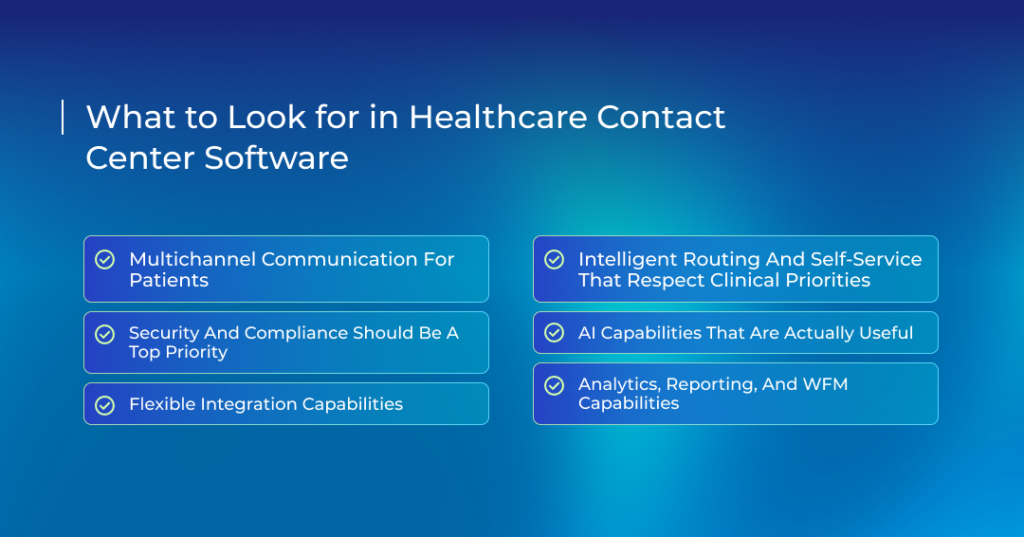
Multichannel Communication for Patients
Patients don’t all want to communicate the same way. Most adults prefer phone calls. Others would rather text. Younger patients might choose a chat widget on your website.
Offering these options lets you meet patients where they are. But those channels need to work together. A patient who starts a conversation via text should be able to switch to a phone call without having to repeat everything. Your agents should see the full conversation history regardless of how the patient contacted you.
True multichannel support means all conversations feed into one inbox. It saves your team from having to dig through multiple systems to piece together what’s happening.
Security and Compliance Should be a Top Priority
HIPAA compliance needs to be baked into every part of your contact center software. The platform should automatically protect PHI without requiring your staff to remember special steps for every interaction.
Look for encryption on all communications, both while they’re being sent and when they’re stored. Every message or chat transcript needs the same level of protection.
Role-based access controls ensure agents only see the information they need for their job. This ties with audit trails that show who accessed which patient’s information, when, and why.
The platform should also offer Business Associate Agreements (BAAs) without hesitation. Consider it a red flag if a vendor won’t sign a BAA.
Automatic patient authentication helps too. The system should verify callers with 2FA before displaying their information. This protects both the patient and your organization from unauthorized access.
Flexible Integration Capabilities
Your contact center software won’t work in isolation. It needs to be connected with your EHR, CRM, scheduler, and probably half a dozen other tools. This deep integration ensures that your agents don’t have to switch between applications. They can work faster and deal with fewer errors.
Here’s how that works: when a patient calls, the system automatically pulls their record from your EHR for your agent. They see all there is to know like appointment history, recent test results, and any other past interaction. The agent doesn’t have to ask for more information. They already know the context and can quickly move to resolve the patient’s issue. This makes every conversation more informed and personal.
Flexible integration capabilities also include bidirectional data flow. Appointments should appear in your scheduling system whenever an agent books an appointment on their end. When a provider updates a patient’s chart, that information should be available to contact center staff right away. Bidirectional support eliminates manual data entry or syncing delays.
Intelligent Routing and Self-Service That Respect Clinical Priorities
Smart routing pushes urgent calls to the front of the queue based on the patient’s history and what they say. A patient who is due for surgery takes priority over someone confirming their appointment time.
This routing intelligence extends to matching patients with the right type of agent. Patients get expert help on the first call instead of being transferred multiple times.
Self-service options should always support live agents. An IVR that understands natural language can handle basic tasks like appointment confirmations and prescription refill requests. Patients get answers in seconds without waiting for an agent. But the system should also recognize when a request is too complex or when a patient needs reassurance. These get routed to a human specialist.
AI Capabilities That Are Actually Useful
AI is everywhere in healthcare marketing right now but most of it is hype. The AI features you want are the ones that solve real problems your team faces every day.
Let’s start with speech analytics. The system can listen to calls and flag quality issues and compliance risks. It automatically identifies patterns like agents rushing through scripts or patients expressing confusion to present coaching opportunities.
AI assistants handle repetitive tasks around the clock. They can schedule appointments and help with collecting intake information, among other things. They give your staff breathing room to focus their efforts on tasks that actually require empathy and judgment.
Advanced AI models support sentiment analysis that can spot emotional cues like anger and frustration during live calls. Predictive routing builds on that intelligence. It looks at past interactions to understand which agents resolve certain issues fastest. Calls are then matched to the agent most likely to help on the first try. The result is shorter calls and fewer transfers for patients.
Analytics, Reporting, and WFM Capabilities
Dashboards give your contact center complete visibility into what’s working and what’s not. They show current call volume and average wait times in real time. They also surface abandonment rates and other key metrics. Managers can see problems developing before patients start hanging up.
Historical reports further help by showing how trends are developing over time. This helps you check whether wait times are improving or if one agent is consistently struggling than others. These insights drive continuous improvement.
Workforce management tools help you staff appropriately. They forecast call volume based on historical patterns and help build schedules that match demand. This means fewer periods where you’re either overstaffed or overwhelmed.
How a Healthcare Contact Center Software Supports the Patient Journey
A healthcare contact center solution does more than answer calls. It coordinates every touchpoint patients have with your organization. It creates a connected experience where patients feel heard and supported at every stage.
Faster Scheduling and Easier Access to Care
Modern healthcare contact center software lets patients get appointments faster. When someone calls to book a visit, the AI assistant automatically checks and suggests open slots based on their preferences. Confirmations, as well as rescheduled appointments, show up in all connected systems so your agents always see the latest information. Patients don’t bounce around repeating themselves.
Some platforms let patients schedule appointments themselves through a web portal or mobile app. Your front desk doesn’t even have to send reminders. The system takes care of that as well.
Patient Preparation Before the Visits
Automated intakes ensure patients walk into their appointments fully prepared. The system sends forms and other necessary paperwork to patients via their phones in advance. They can submit and verify their information from their homes instead of a crowded waiting room.
Patients also receive directions and what to expect during their visit. This includes fasting or medication requirements before an upcoming procedure.
Your front desk no longer has to manually enter information or call patients to confirm details. Patients arrive prepared and move straight into their visit without unnecessary delays.
Support for the Patients During Care and Telehealth
Most contact center platforms integrate telehealth tools to support patients during their virtual appointments. They allow agents to see if a patient has successfully connected or needs assistance. If it’s the latter, agents step in to troubleshoot in real time. This removes friction from virtual care and keeps appointments running on time.
But remote care doesn’t end with the video session. The same system helps patients manage prescriptions and care instructions afterwards. The result is a telehealth experience that feels coordinated and human.
Better Post-Visit Support and Follow-ups
The best healthcare contact center software ensures continued care through automated and personalized follow-ups that don’t feel robotic. The system automatically reaches out to patients after a visit to ask how they’re feeling or if they have any questions.
AI adds another layer to this outreach. It pulls data from your systems to understand who needs attention and when. Someone in recovery might receive daily check-ins that taper to weekly messages as they stabilize. A chronic patient may only need monthly follow-ups.
Addressing General Billing and Insurance Queries With Ease
Patients expect billing confusion to be cleared on the first call. The only way agents can meet this expectation is when they have instant access to billing data through integrated healthcare systems.
They don’t have to transfer patients to another department because the system shows them account balances, payment history, and insurance details in a single screen. Agents can, hence, explain charges and answer coverage questions with ease.
Automation helps here too. IVR systems can verify who’s calling and pull their account details before an agent ever picks up. That context saves time and prevents patients from repeating themselves. Many providers also rely on AI assistants to answer basic questions like payment status or upcoming due dates. These calls don’t get routed at all.
Creating a Consistent Experience Across Every Channel
Patients expect the same quality of support whether they call, text, email, or use a web portal. A contact center software specifically designed for modern healthcare unifies these interactions.
Agents see the entire conversation history when a patient texts a question and then calls later that day. They don’t ask the patient to repeat information or explain their situation again. This continuity builds trust and saves time.
Omnichannel platforms also maintain consistent tone and branding across channels. Automated messages sound like they come from your organization instead of a generic bot.
This creates a smoother experience for patients who often switch between channels based on convenience.
Choosing the Right Healthcare Contact Center Solution for Your Organization
Comparing reviews and feature lists only gets you so far. You need to confirm that the platform aligns with your goals today and can scale with your needs tomorrow.
Clarify Your Patient Access Goals
Start by specifically defining what success looks like for your organization. Something generic like “improve wait times” won’t help. You need a measurable outcome like “reduce wait times to under 2 minutes”.
Each goal points to different features. Look for automated reminders if patients are failing to show up. Prioritize intelligent call routing and AI assistants if you’re facing long wait times.
These become your north star during vendor demos and budget discussions.
Decide on Your Must-Have Capabilities
Your goals determine what features you actually need. These are different from features that are just nice to have.
Scheduling tools matter more than complex workforce management if you’re focused on patient access. Look for strong call recording and quality monitoring if call quality is your target.
HIPAA compliance isn’t optional. Neither is EHR integration if you want agents to access patient records during calls. Core communication channels (phone, text, web chat, etc) should work seamlessly on a single platform.
This framework keeps you focused during vendor evaluations.
Match the Solution to Your Scale and Complexity
A small clinical team needs different healthcare tools than a hospital system with multiple locations. The former benefit from simple, affordable solutions that handle basic scheduling and communication. The latter, however, needs coordination and integration across a large scale.
Consider your current volume and growth plans. Your platform shouldn’t require a complete overhaul if you expect your calls to double in the next year. The right fit today should still work for your organization three years from now.
Prioritize Ease of Use for Frontline Teams
Even the most expensive contact center software will fail if your healthcare team can’t use it effectively.
Complex interfaces slow agents down. They shouldn’t be clicking through five screens just to schedule an appointment. Intuitive designs that put critical information front and center should always take priority.
Training time matters as well. A system that takes weeks to master disrupts service and slows your rollout. Ask vendors about their typical training timeline and what resources they provide.
Don’t forget to test the agent experience during demos. Have someone from your team sit at the console and try common tasks like scheduling an appointment or pulling patient records. If they struggle in a controlled demo, imagine what happens in a busy contact center.
Compare Vendors on Value Instead of Price
Check what you get for your money. Does the vendor offer ongoing training and reliable support? How frequently do they roll out updates or new features that keep your system current?
Ask about hidden costs. Some vendors charge extra for API access and additional channels. Others include these in their base package.
Don’t forget to ask for references from organizations similar to yours. This often gives you an idea of how well your contact center will run.
Then calculate potential ROI. How much do you save on labor if automated scheduling saves your team 10 hours a week? How much more revenue flows in if reducing no-shows frees up 50 appointments a month?
The right healthcare contact center solution pays for itself through operational savings and increased patient volume.
How to Switch From a Legacy Call Center to a Modern Healthcare Contact Center
There’s a framework that healthcare providers can use when moving away from their old contact center setup. The steps below ensure no disruption to patient care during the transition.
- Set a baseline of where you stand right now and what needs fixing. Document your current tools and track your key metrics. This data will later be used to tell you if your new platform has made any improvements.
- Map your future workflows and prioritize which tasks should move first based on pain points. Maybe appointment reminders need to go digital before you change how billing calls get routed.
- Your new contact center software needs to connect with your existing EHR and PMS. List every system that touches patient data and confirm compatibility before signing any contracts.
- Run pilot programs. Start with one department or a single use case. Maybe let your scheduling team test the new appointment booking workflow for one patient group for two weeks. Gather feedback and fix any issues before expanding.
- Build training around real scenarios your team faces daily. Show them how to handle a complex insurance question in the new system or pull medical records from different sources. Let them practice routing urgent calls. Keep these sessions short and hands-on.
- Pick three to five metrics and check them weekly during the transition. Most providers choose first-call resolution rate, average handle time, and patient satisfaction scores. Increase the intervals to a month after you’re stable.
The Transformative Role of AI in Healthcare Call Centers
AI can fundamentally change how your healthcare contact center operates. But only if you use it right.
- Automation reduces manual work. Your teams no longer have to spend time on repetitive tasks like appointment confirmations and refill requests. The system handles them 24/7.
- AI routes calls based on intent instead of keywords. A patient calling about chest pain goes straight to a nurse. Billing questions land with your financial team. No more bouncing between three departments before finding help.
- AI assistants can ask screening questions and collect symptoms to flag urgent cases. Someone calling about severe symptoms gets escalated instantly. Routine questions about office hours or insurance coverage get answered without tying up a nurse.
- AI transcribes conversations in real time before automatically extracting key details and updating records. Your agents spend less time typing notes and more time listening to patients.
AI is here to assist staff. It’s not meant to replace your teams. That distinction matters because healthcare depends on human judgment and trust. Technology works best when it takes on routine, predictable tasks. This frees your team to handle situations that demand empathy and clinical insight. This division of labor creates better outcomes for everyone involved.
Why Televox for Healthcare Contact Centers?
Healthcare contact centers sit at the center of nearly every patient relationship. They shape how care is perceived long before a visit begins. However, when these interactions feel disconnected, patients start to lose trust and staff begin to feel the strain.
Televox is built for this reality. It’s designed to support high-volume communication without losing the personal touch patients expect.
That foundation comes to life in our Enterprise Edition. It treats every interaction as part of a continuous patient relationship instead of an isolated moment. AI plays a supporting role here by stepping in where speed and consistency matter most. This allows your teams to stay focused on complex situations that require human judgment.
Engage, our conversational AI solution, uses intelligent virtual agents (IVAs) to handle routine tasks like scheduling, reminders, and answer common patient questions across channels. These IVAs give quick answers to patients 24/7 and breathing room for your staff.
Insights360 and Journey Insights work together behind every interaction to show you what’s working and what’s not. You can see how patients move through each touchpoint and how communication impacts outcomes like no-shows, payments, and engagement.
That insight makes it easier to act at the right moment. You can send reminders when they matter, simplify check-in and billing, strengthen your online reputation, and extend care through digital programs that help reduce readmissions.
If your contact center supports an enterprise operation, this level of coordination is what keeps growth from turning into friction. Schedule a demo to see how Televox can help you scale patient communication without sacrificing connection.
Related Posts