Surveys are helpful, but they often hide underlying issues. Someone who was able to book…
7 Best Dental Patient Communication Platforms: A Buyer’s Guide
Dental patient communication has moved well beyond appointment reminders. Large practices and hospital-based dental teams often have complex workflows and multiple stakeholders. Strict compliance standards also add to that growing pile of demands. Hence, the “best” solution really comes down to the one that fits your organization.
This buyer’s guide offers a practical overview of seven leading dental patient communication platforms. We’re evaluating based on real-world criteria instead of just ranking tools by popularity. Workflow alignments, patient experiences, system integration, compliance readiness—these are what matter for dental practices at scale.
Why Dental Practices Are Upgrading Patient Communication
A single no-show per day costs dental practices between $20,000-$70,000 annually. The financial impact is even worse when you consider that no-show rates reach 15% across the U.S. on average.
But missed appointments are only part of the problem. Your front desks are always under constant pressure. They’re drowning in phone calls while dealing with patients who just walked in. Forgetting or delaying even one message here often means an empty slot and lost revenue.
Patient expectations have also changed. Most want flexibility in managing their appointments outside office hours. Your already overburdened front desk can’t be expected to deal with all of this.
It’s why dental practices are now looking into software and platforms that can handle routine communications and tasks within seconds. This stops your staff from spending hours on repetitive work and burning themselves out.
Messages and reminders go out automatically. Patients get their flexibility of confirming appointments online with a single tap. Your staff is able to track them and their response rates to ensure a full schedule.
Upgrading your patient communication doesn’t just affect efficiency. It impacts patient experience as well as your ability to grow.
Best Dental Patient Communication Systems for Clinics and Hospitals
Patients now expect the same convenience from their dental practice that they get everywhere else. They want instant booking, text reminders, and quick answers to simple questions.
The platforms below handle everything from appointment confirmations to review management. Each one connects with popular practice management systems, though they differ in how well they execute core functions.
1. Televox
Televox delivers a comprehensive dental communication platform for practices and health systems that need scale, reliability, and intelligent engagement.
Conversational AI powers automated workflows and virtual agents to handle appointment scheduling, confirmations, follow-ups, and self-service interactions across SMS/RCS, voice, email, and web chat.
The multichannel approach lets you reach patients on the channels they prefer while freeing your staff to focus on tasks that need their attention.
Automated digital care programs keep patients on track, sending pre-visit instructions and post-procedure check-ins without any manual work.
Televox also integrates perfectly with your EHR system and enables two-way communication at every step. You can send mass immunization messages or run educational campaigns while tracking analytics to understand what really works.
With unmatched efficiency and engagement capabilities, Televox stands out as one of the best dental patient communication software solutions out there.
2. NexHealth
NexHealth centers on automated online scheduling that stays in sync with your practice management software. Patients see available appointment times in real time, so they can book straight from your website or even directly from Google search results.
It supports credit card deposits for new patient appointments and digital forms to collect patient information before visits. Both features help reduce no-shows and speed up processing times.
Reminders and confirmations are automatically sent by text or email based on patient preferences. This keeps communication consistent without manual effort.
Integration is a key strength. The Synchronizer API links NexHealth with Dentrix, Open Dental, Eaglesoft, and other PMS platforms through bidirectional data flow, so updates in one system appear in the other.
The platform also handles payments, insurance verification, and review collection from a single dashboard. However, some users report occasional syncing issues with PMS integrations under heavy loads.
3. Solutionreach
Solutionreach supports all the main features a dental practice would want from a communication system. It connects with hundreds of practice management systems through its SyncAssure integration layer and sends appointment reminders by text, email, or voice.
The platform particularly stands out for its insurance eligibility checking. You can verify coverage before appointments to prevent potential billing issues. Digital intake and pre-visit messaging further cut down on manual follow-ups and ensure patient information stays accurate across integrated systems.
Solutionreach also supports patient reactivation campaigns, review requests, and treatment follow-ups through configurable messaging. Dental teams can control timing, channels, and message content, though reporting options are more limited than some newer platforms.
The interface might also feel dated and initial setup can take time, especially for practices with complex workflows or multiple integrations.
If your practice depends on organized admin workflows, Solutionreach keeps patient messaging and management fully aligned.
4. Weave
Weave offers a unified communication platform that promises “amazing” patient experiences. Its dashboard shows patient details and appointment history whenever a call or message comes in. Hence, your staff immediately moves to a resolution instead of asking for more information.
Weave also supports digital forms that patients complete before visits and text-to-pay links that appear in billing messages. Review requests can be sent automatically after appointments, and the platform gathers feedback from common review sites so teams can manage responses in one place.
There’s an analytics feature to track call volume, messaging activity, reminders, and trends to help teams see how communication performs.
Weave now includes AI enhancements that assist with message handling and call insights. Your staff has an easier time drafting personalized responses and tagging interactions.
Most users report the platform’s communication tools work well overall, but some mention occasional glitches in phone/text syncing under heavy use.
Weave, however, is mostly positioned for medium or larger practices. Smaller dental practices may find the pricing relatively high compared with simpler tools.
5. Demandforce
Demandforce combines messaging, scheduling, and reputation tools into a single dental communication software.
You can customize message templates by appointment types and run email campaigns to improve outreach. That said, these campaigns only support general outreach. Large practices will likely want deep segmentation seen in some dedicated marketing platforms.
Reputation tracking is one of Demandforce’s main selling points. The system drives online review requests after visits and collects feedback across platforms like Google and Facebook. This keeps reputation data in one place and helps teams monitor responses.
Demandforce also includes online appointment booking tools you can embed on your website or social pages so patients can schedule without calling.
This makes up a consolidated but highly efficient communication platform for dental teams looking for more ways to connect with patients.
6. Lighthouse 360
Lighthouse 360 automates core dental communication tasks like appointment reminders and confirmations via email, text, and phone. It supports full integration with several popular PM systems. Unless you’re using a custom or outdated management software, LH360 will automatically show your confirmations in the schedule without any manual effort.
Dental teams looking for a waitlist management feature will be happy with LH360. The platform fills last-minute cancellations by contacting patients about available slots and offering them the chance to schedule.
You can tailor reminders for different procedures and have the system ask patients to leave feedback on common review sites.
There’s also a message history tab that lets staff review past reminders and confirmations to keep follow-ups consistent.
7. Intiveo
Intiveo’s patient engagement software stands out for its confirmation flexibility and messaging control. The feature set is lighter than some enterprise dental communication systems, but it fits teams that want clear rules and adaptable patient outreach within a single platform.
You get appointment reminders, recalls, and follow-ups through text, email, and voice. There is also two-way texting to keep patients engaged between visits without relying on phone calls.
Confirmation workflows are highly configurable. You can adjust message timing, reminder frequency, and wording by appointment type or provider. If a patient doesn’t confirm, the system follows the rules you set rather than default actions.
Intiveo also includes reputation management tools that prompt patients to leave reviews after visits. The system tracks new feedback across platforms like Google and Facebook and flags reviews that need a response.
How to Choose the Right Patient Communication Platform for Your Needs
You’ll find plenty of patient communication solutions in the market. But flashy demos or raving reviews are not reasons to invest in a new system. You want something that actually solves your existing problems. That’s how you ensure a high return on your investment.
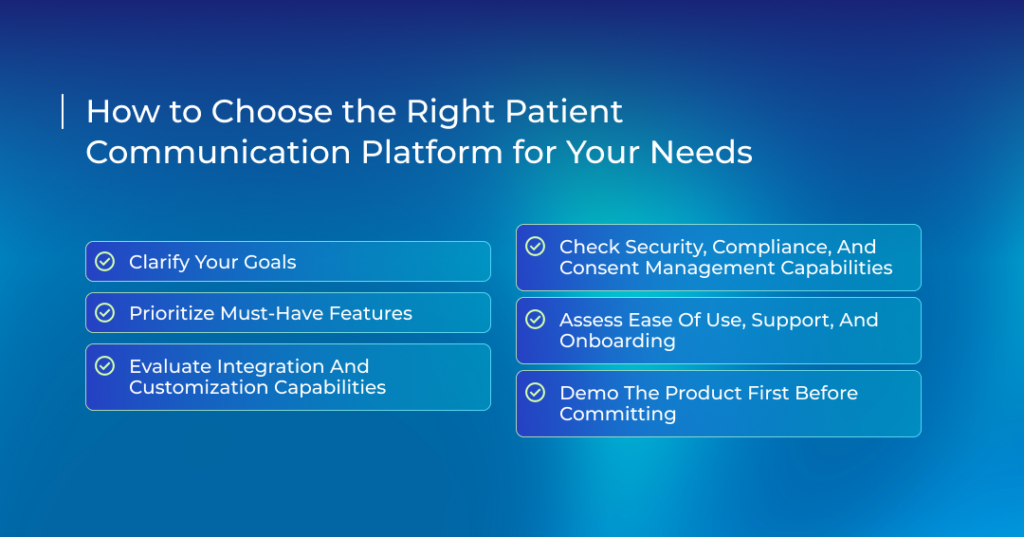
Clarify Your Goals
Start by listing down your main pain points. What do you actually need your dental communication software to solve? Maybe you’re facing too many cancelled appointments or patients are increasingly failing to follow up.
This sets clear expectations from day one. There’s no point in investing in a solution that fixes one of your problems, but requires you to invest in another tool for another problem.
Prioritize Must-Have Features
Not every feature matters for your dental practice. Focus only on these:
- Two-way messaging that meets HIPAA standards
- Automated appointment reminders
- Recall messaging to bring patients back
- Reporting that shows no-show rates and response times
- Integration with your current practice management software
Features that are nice to have depend on your specific needs. Marketing campaigns would make sense if you’re actively growing. Review requests help if you need more visibility online.
Take note though. A dental communication platform loaded with unused features costs money without delivering value. So pick what you’ll use daily.
Evaluate Integration and Customization Capabilities
Your new software needs to work with what you already have. Check compatibility with your existing PMS and confirm that it syncs data automatically.
Some platforms offer read-only access. Others write data back to your PMS. Read-only means you can pull patient data for messages. Read-write means when patients confirm or reschedule through the platform, those changes update your schedule automatically.
This ensures that your staff doesn’t have to switch between platforms..
Customization matters too. Can you adjust message timing? Personalize text based on appointment type? Set different rules for new patients versus established ones?
Check Security, Compliance, and Consent Management Capabilities
Patients share sensitive information with you. Your communication tools need to protect that trust.
Look for:
- Business Associate Agreements (BAA) signed upfront
- End-to-end encryption for all messages
- Multi-factor authentication for staff access
- Audit logs that track who accessed what data
- Clear consent management for patients opting in
Stay clear of vendors that refuse to sign an agreement. Don’t shy away from asking specific questions like how they encrypt data and what happens if you switch vendors? You don’t want to limit your investment to a single provider.
Assess Ease of Use, Support, and Onboarding
Confusing software hurts your adoption rate. Your team will stick to the old communication methods if they have to deal with clunky interfaces.
Templates should be obvious. Your receptionist shouldn’t need a manual to send a reminder.
The best approach is to test your daily workflows and watch how many clicks each task takes. Scheduling should take seconds, not minutes. Pulling a report should require someone to dig into three different layers of interfaces.
Support equally matters for your patient communication platform. Systems break down. It’s normal. But your vendor should be available with a team of specialists to quickly get you back online.
Onboarding determines success. Good vendors guide you through setup. They help migrate data and train your staff. They don’t disappear after handing you login credentials.
Demo the Product First Before Committing
Never buy a communication platform without testing it yourself. Finalize three vendors and request demos. Make sure to use real scenarios from your dental practice.
Most vendors also offer pilot programs. They allow you to use their software for a limited time. This gives you an excellent opportunity to demo the platform with a small patient group or workflow.
Track your results and compare them with your existing baseline. Did the system help increase appointment confirmations automatically? Were patients easily able to leave feedback? Did your staff spend less time chasing patients on the phone?
Numbers reveal the truth that sales pitches hide. If no-shows drop 25% during your pilot, you’ve found your answer.
Find Out if Televox Is the Right Patient Communication Solution for Your Needs
Running a busy dental practice or managing a high-volume health system means patient communications can quickly become overwhelming.
Televox’s Engage platform uses conversational AI to take routine tasks off your plate. Our virtual assistants help patients get quick answers, manage their bills, find providers, and handle prescription refills.
Unlike traditional chatbots, our IVAs respond naturally and keep interactions accurate and timely. This lets your team focus on care while patients get the seamless communication they expect.
Televox doesn’t stop at automation. Combine Insights360 with Journey Insights, and you gain a full picture of every patient interaction. You can see who responds, track follow-through, and spot trends across channels.
These insights turn raw data into clear guidance, helping you refine workflows, campaigns, and messaging with confidence.
If your practice manages high volumes, relies on automation, and needs reporting that actually informs decisions, Televox fits naturally into your day-to-day operations.
Schedule a demo, and we’ll show how to streamline your communications and give your dental team more control.
Related Posts